

Prenumerera på Saramonic
Om du har några frågor, tveka inte att kontakta oss.
Genom att registrera dig godkänner du att ta emot e-postmarknadsföring.
Du kan läsa mer om hur vi hanterar användarinformation genom vår Integritetspolicy.


Kunde inte ladda tillgänglighet



Hub-fri

Fjärrintercom

Dubbelantenn

ClearTalk™

Få kontroll

DECT Tech

Saramonisk app


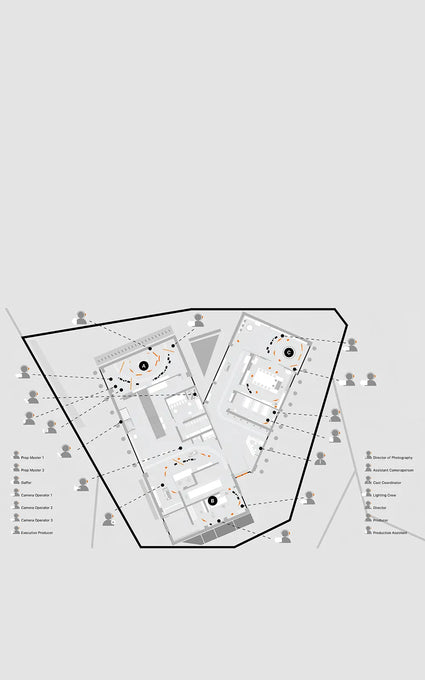
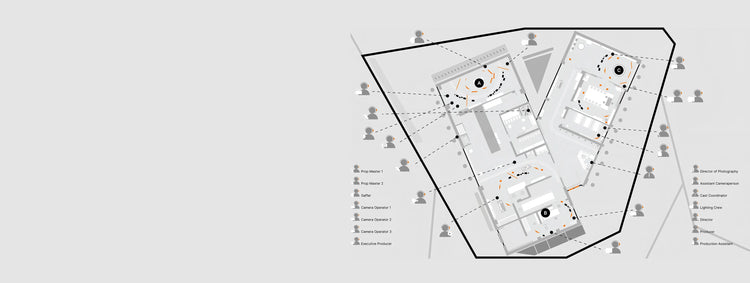
På inspelningsplatsen kan produktionsteamet sömlöst kommunicera med kameraoperatörerna och belysningsteamet för att koordinera bilder och fånga perfekta bilder i realtid.
På inspelningsplatsen kan produktionsteamet sömlöst kommunicera med kameraoperatörerna och belysningsteamet för att koordinera bilder och fånga perfekta bilder i realtid.
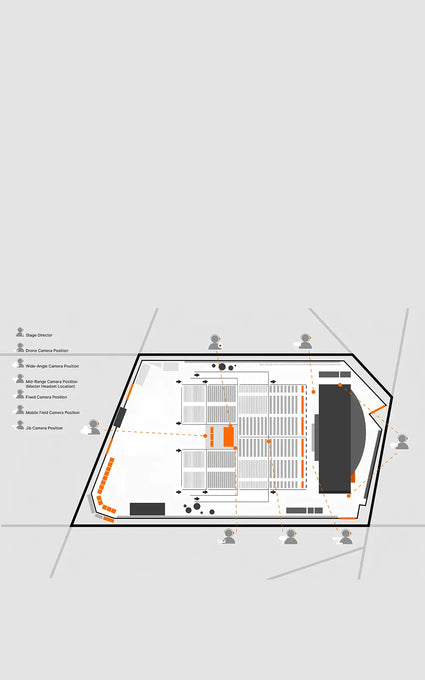
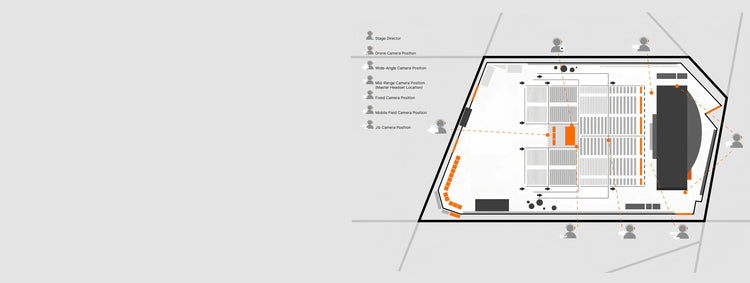
Under ett liveframträdande kan regissören omedelbart vidarebefordra signaler till videokortoperatörer och olika kamerapositioner, vilket säkerställer sömlösa övergångar mellan kameraflöden och fångar varje vinkel av föreställningen.
Under ett liveframträdande kan regissören omedelbart vidarebefordra signaler till videokortoperatörer och olika kamerapositioner, vilket säkerställer sömlösa övergångar mellan kameraflöden och fångar varje vinkel av föreställningen.
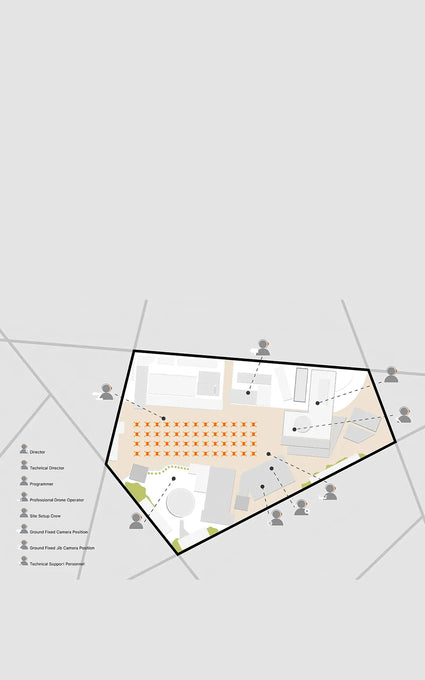
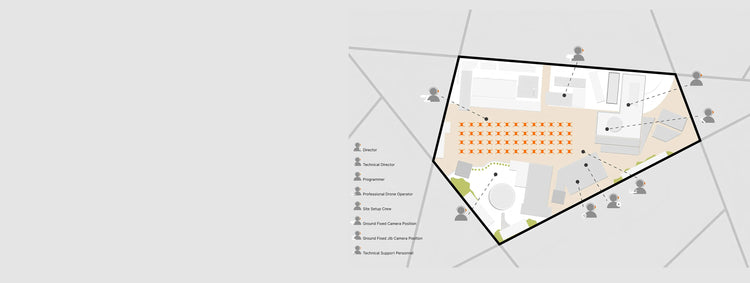
Under en drönarljusshow kan regissören kommunicera med drönaroperatörerna för att justera formationer, samtidigt som han koordinerar med markpersonalen för att säkerställa att livesändningsfilmerna är perfekt synkroniserade, vilket skapar ett fantastiskt visuellt spektakel.
Under en drönarljusshow kan regissören kommunicera med drönaroperatörerna för att justera formationer, samtidigt som han koordinerar med markpersonalen för att säkerställa att livesändningsfilmerna är perfekt synkroniserade, vilket skapar ett fantastiskt visuellt spektakel.
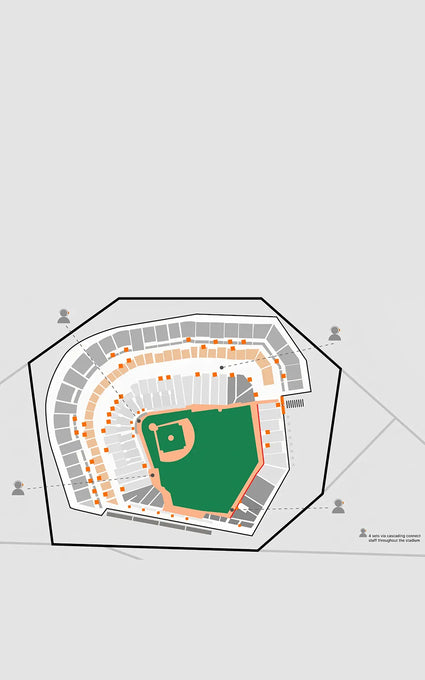

Vid ett större idrottsevenemang, som OS, kan evenemangsledaren sömlöst kommunicera med tränare och domare, vilket säkerställer effektiv koordination och snabbt beslutsfattande för att optimera idrottarnas prestation och säkerhet under högt pressade ögonblick.
Vid ett större idrottsevenemang, som OS, kan evenemangsledaren sömlöst kommunicera med tränare och domare, vilket säkerställer effektiv koordination och snabbt beslutsfattande för att optimera idrottarnas prestation och säkerhet under högt pressade ögonblick.

DE.Fenchel och Janisch

UK.John E Fry

luafilmare

paradoxmedia.pl

USA. Crimson motor

BR.mkjuniorbr

NL.Red Ramteknik

UAE.mohammadrezaie.dop
Adjust the microphone to be 2-3 cm from the corner of your mouth, not directly in front, to avoid breath “pop” noise.Avoid covering the antenna with your hand to prevent signal interference or damage.
If the master hasn’t paired with all remotes, communication won’t work, and the blue light will blink slowly. You can press the power button on the master to exit pairing.
The power indicator stays blue when the battery is above 10%. If it drops to 10% or less, the indicator flashes red, and you’ll hear a “battery level low” alert every 10 minutes. You can also check battery levels via the Saramonic app.
On-ear Foam Cushions: Ventilated and comfortable for long-term wear in hot conditions.
Over-ear Cooling Gel Cushions: Provide excellent isolation for clear communication in noisy environments.
Master One-click Broadcast: Allows the master to mute all connected remotes and issue direct commands in case of an emergency.
Remote One-click PTT: Enables remotes to communicate privately without picking up unwanted sound.
Note: When using this feature, both master and remote are muted, which can be turned off manually.
It allows sound recorders or anyone needing to monitor audio on set to avoid the discomfort of wearing two headsets.
Pre-shoot Checks: Ensure all devices are sufficiently charged, connected, and ready.
In-shoot Control: Master can mute remote or initiate 1-on-1 talks.
Additional Features: Adaptive Frequency Hopping (AFH) via mobile GPS location and OTA firmware updates.
Note: AFH requires all remotes connected and GPS enabled. Frequency adjusts automatically — no manual control. If AFH fails, reset the master and re-pair with the remotes (WiTalk9 series only).
WiTalk9 connects wirelessly to the app, while WiTalk9 SE uses a USB-C connection.
User Expansion: Expand team talk channels and extend transmission range via cascading using the LINK cable.
Remote Intercom: Any headset can connect to a phone or computer via the LINK cable for real-time remote communication. Only the WiTalk9 master supports wireless LINK function. One headset connects the entire set.
Monitoring: Connect the headset to a control board for monitoring during large events or on demanding film sets via the LINK cable.
Comfortable Wearing: For comfort in hot environments or when wearing a helmet, connect a small external earpiece via the LINK port (audio in one ear only).
Note: The wired LINK function is only supported via the Saramonic LINK cable.
After connecting the master from Set A to any remote from Set B with a LINK cable, hold the ENC button on both headsets for 3 seconds until the purple light turns on. To ensure stable signal coverage, it's recommended to place these two headsets in a central area of use, preferably on a stand, and limit their use during cascading.
Press the volume knob and mute button simultaneously to toggle sidetone, indicated by a beep. Please note that due to the different propagation paths of sound through air and circuitry, there may be a slight delay in what you hear. When the sidetone feature is active, you must wear the headset properly; otherwise, it may cause whistling. Additionally, sidetone may introduce issues such as electrical noise during cascading, so it is recommended to disable it in such scenarios.
This feature requires a master station device, which will be released in the future. Stay tuned !
Om du har några frågor, tveka inte att kontakta oss.
Genom att registrera dig godkänner du att ta emot e-postmarknadsföring.
Du kan läsa mer om hur vi hanterar användarinformation genom vår Integritetspolicy.
Tack för att du prenumererar!
Det här e -postmeddelandet har registrerats!
Redigera alternativet
Back In Stock Notification